SPONSORED ADS

Showing posts with label #Socialmedia. Show all posts

Monday, November 14, 2016

DPFaces - #1 Nigeria Community


DPFaces - #1 Nigeria Community

DPFaces.com is a Nigerian Community (Nigerian Social Media), where you get to find friends, connect, chat, explore, share ideas and more.
This is a vibrant and user-friendly entertainment network, which is very responsive according to your device.
http://viid.me/93OIF

DPFaces is the best place to keep up with your Naija friends faster than ever.

What makes DPFaces (DPF) a Unique Community:

• Find and Chat with Friends

•Meet people by location, and more.

• See what friends are up to

• Share updates, photos and videos

• Add Poll

• React To Posts

• Create Photo Album

• Add/Follow New Friends

• Pinch Friends

• Get Friends Activity Log

• Get Real-Time Notifications

• Create Blog Posts

• Create Forum Topics

• Share News, Tutorials, Latest Trending, etc. with DPF's users

• Create Pages/Groups• Add and Watch Videos (Movies)

• Sell Your Item (Market Place)

• Play/Promote Musics

• Play Online Games

• Draw (only available with PC)

• Advertise Your Product/Content And many more...


http://viid.me/93OIF
  
DPFaces is here to create a face for you, in every way possible.
You can explore DPF by visiting www.dpfaces.com and also download DPF's Android Application from Google Play Store via the link below.
Do well to rate DPF with a 5-star, so as to inspire us in providing a better platform in the years to come.

You lose nothing by joining others on the network, but gain more, because there are thousands of users just like you, who are willing to have the best experience with you, willing to meet someone with your kind of personality and wanting to be heard, be your friends, help in their own way and lots more.

All Accounts, Data/Info are secured (SSL)

Register Now @ https://www.dpfaces.com/signup
Read More »

Friday, August 05, 2016

Facebook opened the biggest and most advanced hardware lab in Facebook's history.

Facebook opened the biggest and most advanced hardware lab in Facebook's history.

Over the next 10 years, we're building everything from Oculus headsets to solar-powered planes. We've always had labs for each team, but our new lab will be a hub where engineers can work together to make even faster progress towards connecting the world.
The new lab is the size of half a football field and is filled with everything from a 5-axis water jet that can cut through steel and granite to a 9-axis mill-turn lathe. It's even got an electron microscope and a CT scanner that will let engineers examine components for failure analysis. All this gear was so heavy that we had to remove the floor of the building and drill down to the bedrock to put in new foundation.
I'm looking forward to seeing everything we create. There is so much to do and we have some exciting times ahead!


The red plastic plates with holes are "tool-holder" racks. The tool-holders ( round metal spindles ) are used to hold cutting tools, like drills, taps, etc. It also helps mount the cutting tools into the machine seen above with the guy operating. The machine the guy operating is call a Computer Numerical Controls or CNC machines. And my full time job is programming CNC machines 😊....CNC Programmers FTW !!!


beautiful a 5 axis machining center and you still cannot create an algorithm that actually protects people from the bullies

 
Read More »

Tuesday, August 02, 2016

Facebook's solar-powered internet plane takes flight

Facebook's solar-powered internet plane takes flight

Aquila drone, which at cruising speed uses same wattage as three hairdyrers, uses lasers to beam internet to remote regions
The Aquila Facebook plane
 The Aquila Facebook plane will be part of a fleet providing internet access to parts of sub-Saharan Africa and beyond. Photograph: Facebook
Facebook has announced the first successful test flight of a high-altitude solar plane to bring internet access to remote parts of the world.
The Aquila drone.
 The Aquila drone ascends from the runway. Photograph: Facebook
The Aquila drone has the wingspan of an airliner but weighs less than a car. When cruising it consumes just 5,000 watts – the same as three hairdryers or a powerful microwave.
Facebook plane
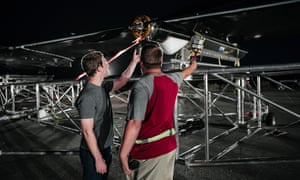
 The final adjustments are made to the drone before takeoff. Photograph: Facebook

The first flight took place on 28 June in Arizona. Facebook said the test went better than expected and that Aquila’s 96-minute flight was three times longer than planned.
Aquila was developed in Bridgwater, Somerset, and the drone, designed to fly non-stop for three months, will use lasers to beam down internet access to remote areas without online capacity.
Facebook has a team of engineers at Bridgwater from fields of expertise including aerospace, avionics and software and who had previously worked at organisations such as Nasa, Boeing and the Royal Air Force.
Facebook founder Mark Zuckerberg and his team watch the drone take flight.
 Facebook founder Mark Zuckerberg and his team watch the drone take flight. Photograph: Facebook
Mark Zuckerberg, Facebook’s chief executive, revealed in March 2015 that the company had been testing drones in the skies over the UK.
Facebook intends Aquila to be part of a fleet of planes that will provide the internet to 4 billion people in sub-Saharan Africa and other remote regions that do not have access currently.
Jay Parikh, Facebook’s head of engineering and infrastructure, said in a blog: “We’re encouraged by this first successful flight, but we have a lot of work ahead of us … In our next tests, we will fly Aquila faster, higher and longer, eventually taking it above 60,000 feet.”
SOURCE: THEGUARDIAN


Read More »

Monday, June 13, 2016

How I Share Blog Posts To Facebook Pages Automatically After Publishing


Today, I will show you how to share your blog posts to Facebook Pages, Twitter, Linkedin Accounts automatically after publishing them on your blog.

There are actually many ways you can do this but in this post, I will recommend you use TwitterFeed as it will allow you to share a blog post automatically to many Facebook Accounts you have rights to publish to.


How To Get Started


==> Sign in to your FACEBOOK account.

==>  Sign in to www.twitterfeed.com IMAGE Below,

==>  Click on "Create New Feed"
==>  Enter your blog name as the "Feed Name"
==>  Enter your blog URL or your feed URL and click "test rss feed" button to ensure it's OK
==> Click "Advanced Settings" and edit the settings as desired. You can just leave it as it is...


==> Click on "Continue to Step 2"

==> Click the "Facebook" Service and click on 'Connect with Facebook"


Allow TwitterFeed to connect to your Facebook.

If successful, you should see something similar to this with a drop-down to select your Facebook page, twitter, Linkedin


==> From the drop down, select the page you want to automatically share your blog posts to.

==> Leave the UTM tags as they are. You can add a "campaign" name though. I use that to track the traffic in Google Anaytics.

==> Click "Create Service" button.

Right on this page, you can add more services. Also take note of the expiry date. Once it expires, it will stop posting. So, you will have to re-add the page.

You can click "Facebook" service again, follow steps above to link more Facebook pages.

When you're done, click "All Done" button.

Thereafter, you can click on "Go to dashboard" button to add more blogs to be linked to Facebook Pages

That's' all.

How are you sharing your posts to Facebook automatically?


Read More »

Monday, June 06, 2016

Facebook as Decided to disable messaging from the mobile web application


In the latest news from Facebook, you can say goodbye to the messaging feature on the mobile web application. Users are being served a notice that reads “Your conversations are moving to Messenger”. What this means is that now, even if you want to just view the messages, you’ll have to download the app and not to mention agree to the long list of ‘permissions’ that come with the act of actually downloading the app.
A Facebook spokesperson confirmed to TheVerge that stripping Messenger out of the main Facebook app is not a test, and will at some point in the near future happen in every country. There are a few exceptions to the new rule, however. First, lower-end Android devices with memory constraints won’t be required to download Messenger. Second, Windows Phone and tablet users will still see messages inside their Facebook apps. Third, messaging will remain, for now, inside Facebook’s newly launched news app Paper.
It might also mean that Facebook will shrink the size of its main app, making it work faster and at the very least clearing up a few MB’s on your device. “Once the whole process is complete, we expect the core apps to be faster,” the spokesperson told the news site. Admittedly, chatting in Messenger is a far better experience than in Facebook’s main app, but some users might be disappointed by the fact that they now need two Facebook apps instead of one.
TechCrunch’s Devin Coldewey raises a valid point in this article when he calls it a hostile move- if everyone in the company is constantly saying that they want to connect the world, shouldn’t a diversity of access options be part of that motive?
Facebook acquired Whatsapp for $19 billion in 2014. The fact that this move comes after an acquisition of mammoth proportions makes it obvious that Facebook is committed to upping its messaging game plan. This is only the next logical move for Facebook, given the fact that Messenger excels in some countries where WhatsApp does not.
Read More »

Monday, April 25, 2016

Facebook Messenger now supports group phone calls


Facebook has rolled out a new Messenger feature that allows users to make group calls.

Over the last 24 hours, users may have noticed the appearance of a phone icon in group conversations.
Users can move group Facebook message threads over to a group call by tapping on the icon and initiating a call.
As Mashable points out, the feature makes Facebook Messenger more competitive with the likes of Google Hangouts, Skype and Slack.
Powered by 
Read More »

Friday, October 16, 2015

Add All Friends To Facebook Group By Single Click


Add All Friends To Facebook Group By Single Click


Facebook groups are best place for any discussion with your own choice friends or other members. No one from outside can interfere in group without admin permission means groups are totally different from pages. In pages every person is free to like page. Groups can be secret, closed or public. But the problem we face in groups is that, we have to add all member manually one by one. Which is time consuming process. As in my recent post i discuss about Invite All Friends to Like Facebook Pages. Which is helpful for inviting too many friend to Facebook page within few secs and its totally time saving method. But that process is only working Facebook pages not on Facebook groups. Today i will discuss about method to add member in Facebook groups. Sometimes we had an account with 5000 or less friends. So its not an easy task to add too many friends and you face difficulty while adding them one by one. Don't worry we care about your precious and so here is simplest and easiest way which will help you to add friends into group within few min by single click.

Steps To Add All Friends in Facebook Groups

  • First of all Log in into that whose friends you want to invite.

  •  Then open your Facebook Group in which you want to add friends.

  • Now Click F12 button to open debugger and then select console box.

  • Now copy script from below given button.


  • Copy paste the whole provided code and then paste them into console box.
add-all-friends-to-facebook-group-script-code
  • Press enter and process will start for sending invitation.
Note:- Don't worry about anything this script is totally safe. In case you have too many friends then you get blocked for using groups or even your account may get locked. 
We Advise use careful.


 If Face any type of problem and want any type of suggestion just feel free to share your comment.


Read More »

Translate

Designed by Mezy Kings