SPONSORED ADS

Showing posts with label tech. Show all posts

Monday, October 10, 2016

TOP 8 Best Wearable Gadgets

 Best Wearable Gadgets

It’s no secret that one of the hottest consumer electronics categories is wearable gear. No matter what activity you are participating in (even the art of sleep), there is a specially tailored gadget to fit your needs.
If you’re on the hunt for the best wearable electronics gear on the market, we’ve got you covered. The following are 10 of the hottest and most effective wearable technologies on the market today.


8 BEST WEARABLE ELECTRONICS GADGETS

Jawbone Up
The Jawbone Up was created to be worn 24/7 to track your sleep patterns, physical activity, and eating/drinking habits. The device syncs to your smartphone via the Jawbone Android or iPhone application and can truly play a role in helping you improve your health.

  • Samsung Galaxy Gear SmartWatch

Samsung Galaxy SmartWatch
The Galaxy Gear SmartWatch is an impressive piece of technology that is compatible with the Galaxy Note and other Galaxy smartphones. In comparison to other Smartwatches on the market, the Galaxy Gear isn’t overwhelmingly bulky, with its 1.63-inch Super AMOLED screen and 1.9 Megapixel camera. The watch gives you the power to make calls James Bond style and benefit from the S Voice personal assistant.

  • Martian Passport SmartWatch - iPhone Compatible

Martian SmartPhone Watch
The Martian Passport is a handsomely designed Smartwatch that is compatible with both iPhones and Android smartphones. It allows for you to use voice commands for its various functions, view notifications, voice text messages, and take phone calls. We love the Martian because of its high-style (somewhat retro) design. It stacks up pretty nicely against the Samsung Galaxy Gear SmartWatch, with the exception of fitness tracking capabilities. If this is a must and you own a Samsung Galaxy smartphone, it’s best you stick with the Samsung watch.

  • Pivothead 1080 HD Polarized Camera Glasses


If you would prefer not to hassle with a mounted camera, Pivothead 1080 Polarized Camera Glasses are an awesome substitute. Wildly enough, they offer brilliant HD video, an 8MP Sony CMOS image sensor for still images, wind-resistant audio recording, and a 75 degree field of view.

  • GoPro HERO 3 Action Video Cam

Go Pro Black
Adventurers rave about the brand because it is undeniably the toughest and most versatile action sports video camera on the market. The GoPro HERO3+ Black Edition ($399.99) is 20 percent smaller and lighter and features 33 percent improved image sharpness and reduced distortion than the Silver Edition ($299.00). Both the Black and Silver editions have Wi-Fi Remote build-in, which work beautifully with the GoPro App.
The third, and least expensive option, is the White Edition ($199.99). You’ll only have 5 megapixels to work with, but is the perfect gateway drug to action sports movie making.

  • Zeal HD Cam Goggles

Zeal HD Cam Goggles
The Zeal HD Cam Goggles are an awesome piece of equipment. They have the power to capture 1080p and 720p high-definition video and 12 megapixel photos. You can also enjoy the Zeal’s 170-degree wide angle camera lens. This happens to be much wider than the majority of action sports cameras on the market. They were also built to be helmet compatible and come equipped with a rechargeable lithium-ion battery that can last up to three-hours.

  • Sennheiser RS 220 Wireless Headphones

Sennheiser RS 220 Wireless Headphones

If you’re looking for top-quality noise-canceling headphones and cost isn’t a factor, the Sennheiser RS 220 Wireless Headphones should definitely be at the top of your list. They include an open, circum-aural headphone andra transmitter, which emits amazingly balanced sound. Sennheiser headphones are also known for being very comfortable.

  • Google Glasses

Google Glasses
Where money is absolutely no object, you can invest in one of the very few pairs of Google Glasses available. For a mere $2,885, you’ll be given the power to use basic voice commands to take photos and videos, utilize GPS, send messages, listen to music, browse the Internet, make calls, and access numerous apps. They are now compatible with both iPhones and Android smartphones.
Read More »

Friday, August 05, 2016

Facebook opened the biggest and most advanced hardware lab in Facebook's history.

Facebook opened the biggest and most advanced hardware lab in Facebook's history.

Over the next 10 years, we're building everything from Oculus headsets to solar-powered planes. We've always had labs for each team, but our new lab will be a hub where engineers can work together to make even faster progress towards connecting the world.
The new lab is the size of half a football field and is filled with everything from a 5-axis water jet that can cut through steel and granite to a 9-axis mill-turn lathe. It's even got an electron microscope and a CT scanner that will let engineers examine components for failure analysis. All this gear was so heavy that we had to remove the floor of the building and drill down to the bedrock to put in new foundation.
I'm looking forward to seeing everything we create. There is so much to do and we have some exciting times ahead!


The red plastic plates with holes are "tool-holder" racks. The tool-holders ( round metal spindles ) are used to hold cutting tools, like drills, taps, etc. It also helps mount the cutting tools into the machine seen above with the guy operating. The machine the guy operating is call a Computer Numerical Controls or CNC machines. And my full time job is programming CNC machines 😊....CNC Programmers FTW !!!


beautiful a 5 axis machining center and you still cannot create an algorithm that actually protects people from the bullies

 
Read More »

Tuesday, August 02, 2016

Facebook's solar-powered internet plane takes flight

Facebook's solar-powered internet plane takes flight

Aquila drone, which at cruising speed uses same wattage as three hairdyrers, uses lasers to beam internet to remote regions
The Aquila Facebook plane
 The Aquila Facebook plane will be part of a fleet providing internet access to parts of sub-Saharan Africa and beyond. Photograph: Facebook
Facebook has announced the first successful test flight of a high-altitude solar plane to bring internet access to remote parts of the world.
The Aquila drone.
 The Aquila drone ascends from the runway. Photograph: Facebook
The Aquila drone has the wingspan of an airliner but weighs less than a car. When cruising it consumes just 5,000 watts – the same as three hairdryers or a powerful microwave.
Facebook plane
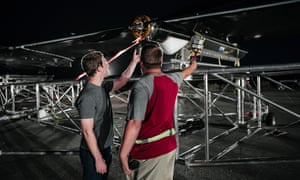
 The final adjustments are made to the drone before takeoff. Photograph: Facebook

The first flight took place on 28 June in Arizona. Facebook said the test went better than expected and that Aquila’s 96-minute flight was three times longer than planned.
Aquila was developed in Bridgwater, Somerset, and the drone, designed to fly non-stop for three months, will use lasers to beam down internet access to remote areas without online capacity.
Facebook has a team of engineers at Bridgwater from fields of expertise including aerospace, avionics and software and who had previously worked at organisations such as Nasa, Boeing and the Royal Air Force.
Facebook founder Mark Zuckerberg and his team watch the drone take flight.
 Facebook founder Mark Zuckerberg and his team watch the drone take flight. Photograph: Facebook
Mark Zuckerberg, Facebook’s chief executive, revealed in March 2015 that the company had been testing drones in the skies over the UK.
Facebook intends Aquila to be part of a fleet of planes that will provide the internet to 4 billion people in sub-Saharan Africa and other remote regions that do not have access currently.
Jay Parikh, Facebook’s head of engineering and infrastructure, said in a blog: “We’re encouraged by this first successful flight, but we have a lot of work ahead of us … In our next tests, we will fly Aquila faster, higher and longer, eventually taking it above 60,000 feet.”
SOURCE: THEGUARDIAN


Read More »

Friday, March 11, 2016

How to Monitor Your Kid's iPhone or Android Text Messages


How to Monitor Your Kid's iPhone or Android Text Messages

Here’s some exciting news for parents looking to monitor their child’s text message activity. Child safety website TeenSafe has launched a new version that not only lets you view your child’s social network activity, but also lets you read the text messages they send and receive on their Android or iPhone.
Better still, you can even read text messages that have been DELETED on the phone!
Text message monitoring has been of huge interest in recent years. According to a Kaiser Family Foundation study, kids spend an average of 7 hours, 38 minutes a day connected to some type of electronic device. The big worry for parents is that they don’t often know what their child is doing on their phone, online, or in the real world — and their kids aren’t always forthcoming with what’s going on in their lives.
From sending friends seemingly innocent (but potentially provocative) photos, to online solicitations, sexting, or befriending some less-than-desirable characters, kids can make mistakes caused by youthful inexperience. Those actions can end up haunting a child and parent forever, but TeenSafe gives parents access and visibility into their child’s world.
TeenSafe also works on an iPhone -- including iOS9. You don’t need your teen’s phone to set it up, and you can monitor the iPhone without needing to jailbreak it, which can invalidate the iPhone warranty. All you need is your child’s Apple ID and password.
The application for Android smartphone installation is slightly different, but just as easy. Just enter some basic info, accept the app on the phone, and you're good go.
TeenSafe enables you to:
  • View your teen's text messages, including deleted texts.
  • See your teen's device location.
  • Monitor call logs and browser history.
  • Monitor Instagram, WhatsApp, Kik messages and more.
Visit TeenSafe.com
Once you register with TeenSafe, the information gets downloaded to your private login page where you can read all the iPhone or Android text messages your child has sent and received. You can also view their phone call logs, phone contacts and web browsing history, and monitor Instagram and WhatsApp activity. TeenSafe also uses the phone's GPS to track its location on a map.
And nothing shows up on your child’s phone, so they won’t know about it unless you tell them.
Admittedly, it can sound a little sneaky, but as long as you are the parent or guardian of the child it’s legal. As for whether or not you should tell your child, TeenSafe goes the common sense route by explaining that the decision is up to you.
Every family is different, and when it comes to protecting your children it’s sometimes good to open a dialogue. Other times it’s better to be discreet, such as when your child has already run into some trouble and you’re now trying to prevent him or her from encountering bigger problems.
So, whether you’re giving your child a cell phone for the first time and just want to keep an eye on them, or you have a teen exposed to more than they’re ready to handle, TeenSafe could be your way to safely and anonymously observe them without being a helicopter parent.
Read More »

Saturday, October 24, 2015

It is pretty easy to guess the Android lock patterns


New research uncovers that Android lock patterns are easily predictable

It is indeed surprising to know that most of the Android lock patterns are predictable because people generally use the most common combinations.
Google introduced the Android Lock Patterns (ALPs) or password alternative in 2008, when it introduced its Android Operating system.
In Android’s lock-screen pattern system, users just need to draw some lines in between the nodes instead of typing any password or PIN. Hence, it is much easier to remember and use them in comparison to the passwords.
However, Marte Løge, a graduate of the Norwegian University of Science and Technology conducted a study on around 4,000 lock patterns. Surprisingly, her study revealed these patterns are pretty easy to guess and chances are that we are using one of these easy ALPs.
This study was a part of her master’s thesis and she discovered that there were some bad practices which were commonly being used while applying these patterns.
Last week Løge gave a presentation on the topic “Tell Me Who You Are, and I Will Tell You Your Lock Pattern” which was held at the at the PasswordsCon conference in Las Vegas. Then, she told Ars Technica that ‘humans are predictable’, she continued “We’re seeing the same aspects used when creating a pattern locks [as are used in]pin codes and alphanumeric passwords.”
Basically, ALPs would involve a minimum of four nodes and a maximum of nine rounding up to a total of 389,112 possible patterns.
Here’s the breakdown:
LENGTHNUMBER OF COMBINATIONS
41,624
57,152
626,016
772,912
8140,704
9140,704
Her findings revealed some interesting facts, she found that the patterns which started at the uppermost left node of the screen comprised of almost 44 percent of these patterns. Those which started from one of the four corner nodes made up of 77 percent of the patterns.
It was observed that users usually used around five nodes which would result in to around 9000 predictable pattern combinations.
Most common patterns just used four nodes and this reduces the possibility of common combinations to just 1,624 making it easy to be guessed.
The most commonly used patterns comprised of moving from left to right and top to bottom, further making it easy to guess the pattern.
Her study also indicated that males and females have a tendency to create patterns in some distinct and predictable ways. She observed that both the sexes preferred using a nine-nodes pattern most of the times and very rarely used the eight nodes pattern though both these provided almost the same number of possible options of patterns.
Her findings also revealed that irrespective of their gender, the starting places used by left handed were similar to their right handed counterparts.
Løge says that it is not only the number of nodes used in the ALPs, but also the specific sequence of the nodes used in the pattern which helps to guess the sequence of the pattern. She explained this by giving an example, “Assigning the nine nodes the same digits found on a standard phone interface, the combination 1, 2, 3, 6 will receive a lower complexity score than the combination 2, 1, 3, 6, since the latter pattern changes direction.”
She also discovered that in comparison, males use more complex patterns such as 2,3,1 sequence and females hardly prefer to use the crossovers.
New research uncovers that Android lock patterns are easily predictable
In case of password breaches, it was found that most common password cracked were “1234567” and “letmein”.
Løge, says that similar to the passwords, ALPs too have similar weakness, she found that almost 10 percent of the patterns took the shape of the alphabetic letter that corresponded to the first initial of user’s name or their spouse or child or any other person who is pretty close to the user. This indicated that there is one-in-ten chance that attacker can predict the ALP. Suppose, attacker knows the names of the victim or their people it becomes all the more easier guess.
“It was a really fun thing to see that people use the same type of strategy for remembering a pattern as a password,” Løge said. “You see the same type of behavior.”
Løge says that by collecting a huge number of ALPs it is possible to build “Markov model” which can help attackers to predict the ALPs.

Ways to make the ALPs better and attack proof:

Løge​ told Ars Technica, that there are ways to make these pattern passwords better and also provided some tips to help users.
Løge ​ says that it is essential to use a whole bunch of nodes and always aim to make a pattern crossover itself a bunch which is difficult to make out from a distance.
She also advises that users need to switch off the “show pattern” by going in the security settings of their phone’s device.
One more important tip is to stop starting the pattern from top left node.
Now that readers have understood the dangers of using the common pattern locks, do try to make your ALPs more complex and use crossovers to avoid being attacked by some crook.
Read More »

Saturday, October 17, 2015

How To Find Wi-Fi Password From Windows, Linux and Mac OS Using Wifresti

Wifresti a simple tool to recover your Wi-Fi password.

Features:

  • Recover Wifi password on Windows
  • Recover Wifi password on Unix

Supporting OS (operating system):

  • Windows
  • Linux (tested on ubuntu)
  • Mac OS

Requirements:

  • Python 2.7

Install Command:

Download Wifresti on GitHub: Wifresti
Read More »

Friday, October 16, 2015

Microsoft no longer letting users opt-out of Windows 10 upgrade


 Microsoft no longer letting users opt-out of Windows 10 upgrade

Microsoft forces Windows 10 down Windows 7/8.1 users throat with mandatory update

Microsoft is virtually pushing Windows 10 down the Windows 7/8.1 user throat it seems. If you haven’t already updated your computer to Windows 10, then prepare yourself for more aggressive update notifications that no longer give you the ability to opt-out.
Many users have reported that they are being barraged with incessant popups that inform them their Windows 10 upgrade will be installed in one hour. Earlier, Windows 7/8.1 users could opt-out of such process but now there is no longer an option to opt-out of upgrading altogether, ZDNet reports.
Microsoft forces Windows 10 down you throat with mandatory update
he fact that Microsoft wants you to upgrade to Windows 10 come whatever may is not lost when not even GWX Control Panel, a third-party tool that lets you manage or sidestep such updates, is not able to do so according to the app’s creator, Josh Mayfield.
If you are seeing either of the above two screens, exactly as they appear here, GWX Control Panel is not yet able to help you,” writes Mayfield, “although I am looking into whether it’s possible to fix these things through software. I do not have any recommendations at the moment, though, unfortunately.”We had reported back in September that Microsoft was forcing Windows 7/8.1 users to upgrade to Windows 10 and also issued a patch that was snooping on Windows 7/8.1 users. The update which is bulky 6GB in size, was being downloaded to users computers even when some users had preferred to stick with Windows 7/8.1 in view of the snooping fears associated with Windows 10.
With the latest forced notifications, it seems Microsoft is hell bent on making Windows 10 the operating system of all Windows users against their wishes.
Read More »

Monday, September 28, 2015

HOW TO DOWNLOAD PAID APPS/GAMES FREE

HOW TO DOWNLOAD PAID PLAYSTORE APPS FREE. 
WOOOOW. DONT u think its Great Been a very long time that having been receiving messages via Social media on "HOW TO GET PAID APPS / GAMES FOR FREE" but now its all here now. Its Simple and easy, 

download this apps called GETAPK MARKET Via link  HEAR Pls kindly subscribe to our Channel for latest on Techs for mobile and PC Follow nd like us on FacebookTwitter Instagram   Get Latest IPS for ur Etisalat with Open VPN for unlimited Download. Add us on BBM  Or contact our Care service +2349033702545 . Please always click the share button. Thanks to all our viewers nd subscribers.
Read More »

Translate

Designed by Mezy Kings